CMSV Client – SOS, Face, and License Plate Alarm Pop-up Settings
1. Prerequisites
- Ensure the CMSV client software is installed and you can log in successfully.
2. Login Method
- You must log in using UDP mode.
- Note: After logging in with UDP, the SOS alarm is enabled by default.

3. Alarm Pop-up Configuration
- Click System Settings in the top-right corner of the client.
- Select Pop-up Parameter Settings.
- Check the following options:
- Face control alarm
- License plate alarm
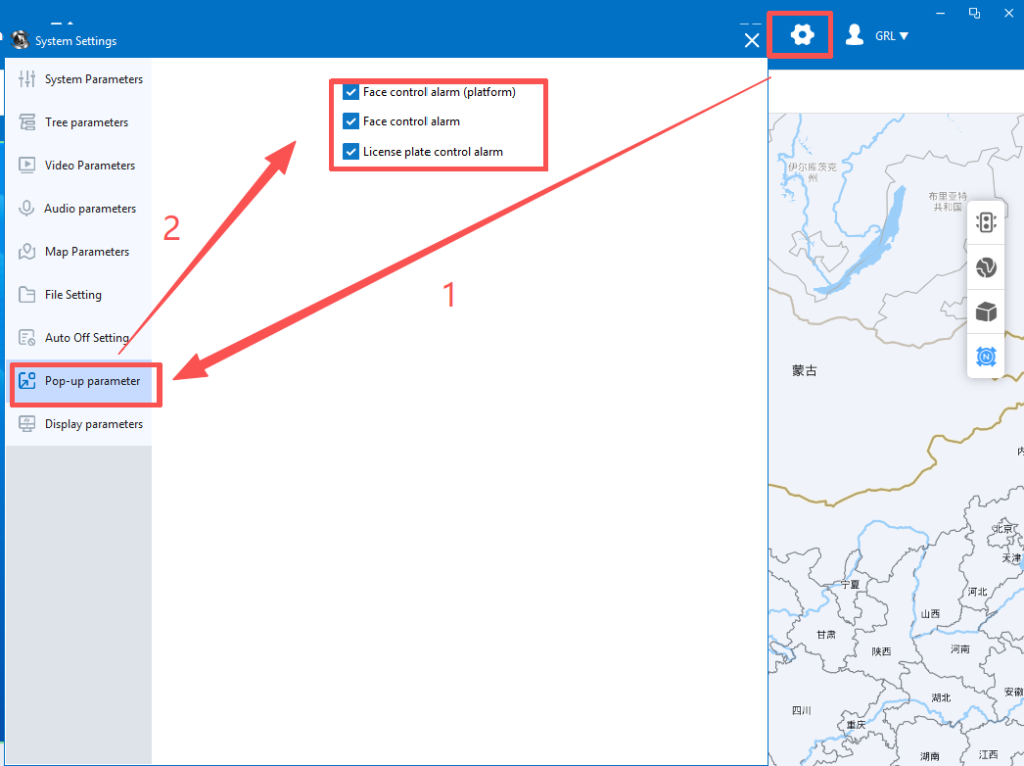
4. Alarm Triggers
The system will automatically send an alarm to the VMS dispatch center with a pop-up notification when any of the following is triggered:
License plate recognition is triggered.
Long press the SOS button on the camera;
Face recognition is triggered;