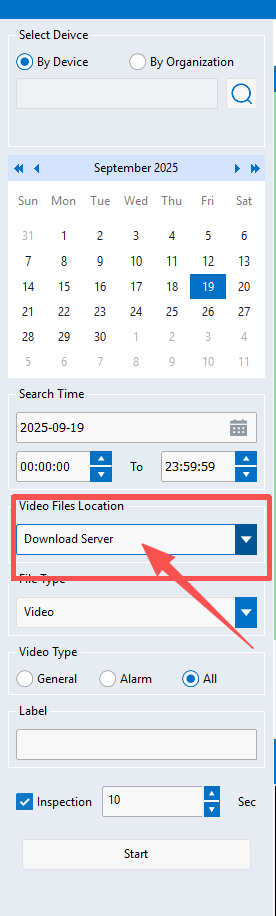
Viewing Videos Uploaded to the Server
Overview
This article explains how to use CMSV to view video files that have been uploaded to the server.
Steps
- Open the CMSV software.
- Click the Record option from the top menu.
- In the Device Serial Number drop-down list, select the target device.
- In the Footage Storage Location field, select Download Server.
- Set the search conditions as needed (e.g., date, time range, event type).
- Click Search/Retrieve to view the videos uploaded to the server.
Notes
- Check that the server network connection is stable to ensure successful retrieval.
- Videos uploaded to the server may be delayed; the most recent recordings may not be synchronized immediately.