How to Reset a Forgotten Password
If you forget your CMSV login password, you can try the following methods to reset it based on the account type:
1. Resetting a Sub-User Password
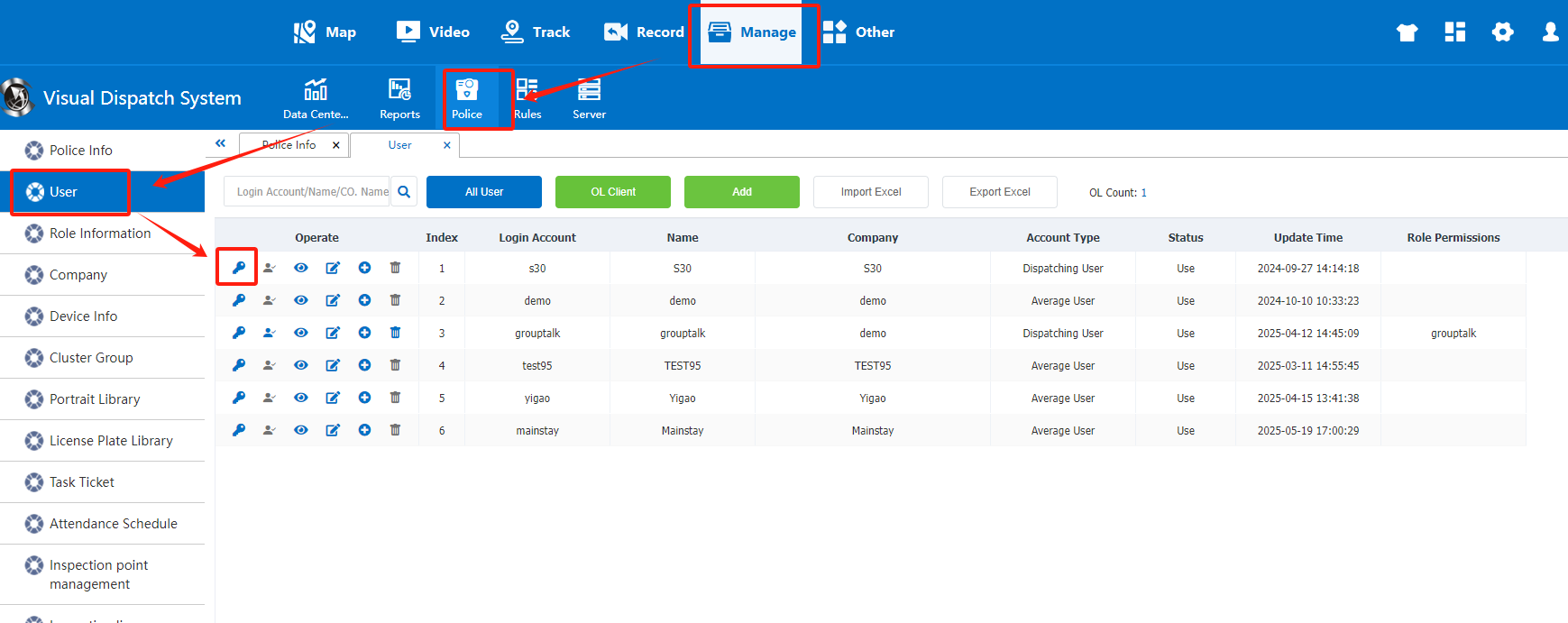
If the forgotten password belongs to a sub-user account, please follow the steps below:
- Log in using an account with administrative privileges.
- Navigate to the Device Management section.
- Click on the password reset icon as shown in the image.
- Enter a new password for the sub-user.
- Click Save to apply the changes.
2. Resetting the Admin Password
If the admin password is forgotten, you will need to use a database management tool to reset it. Follow the steps below:
- Use Navicat or another database management tool to connect to the CMSV database.
- Open the
jt808_accounttable and locate the row with the username “admin”. - Check the value of the
is_aes_encryptfield to identify the encryption type. - Based on the encryption method, input the corresponding value into the
Passwordfield. - Restart the web server to apply the changes.